EXECUTION PLAN · V1.0

Your site still runs on WhatsApp Excel notebooks
It can run on Spyver.

Planning, timesheets, stock, reconciliation, invoices, time cards. What is written in five places today, linked in one tool your crew actually uses, in the office and on site.

Free trial · no credit card

1 toolto rule the whole site
Free trialup to 7 days
0 cardasked to start
2 minto get started

01 / ANATOMY

Every part of the tool, one by one.

Scroll. Each module comes into view with what it reads, what it writes and who it talks to.

ModulePlanning
01/07

Who, where, when.

Drag a crew onto a site and it is reassigned. Each worker sees the change on their phone before the truck leaves.

Reads
Crewssitesleave
Writes
Assignments
Linked to
TimesheetsTime cards
ModuleTimesheets
02/07

Hours that are already right.

One tap on arrival, one tap on leaving. The site manager sees who is missing at 07:05, not at the end of the week.

Reads
PlanningGPS site
Writes
Hoursabsences
Linked to
Time cardsInvoices
ModuleStock
03/07

Material counted, not guessed.

Deliveries, releases and thresholds. When a reference gets low, you know before the crew stops.

Reads
Delivery docketsorders
Writes
Movementsalerts
Linked to
ReconciliationFollow-up
ModuleFollow-up
04/07

Progress, step by step.

Each site has its plan. Quantities placed, photos, remarks: entered on site, visible at the office instantly.

Reads
Site plansteps
Writes
Progressphotos
Linked to
InvoicesReconciliation
ModuleReconciliation
05/07

Delivered, ordered, billed.

Supplier list against order sheets against what arrived. The gap shows up in red, line by line.

Reads
StockFollow-up
Writes
Nothing: it only compares
Linked to
Invoices
ModuleInvoices
06/07

Billed from what really happened.

Invoices are built from the real progress. You check, you send. Nothing to retype in the evening.

Reads
Follow-upCustomers
Writes
InvoicesPDF
Linked to
Dashboard
ModuleTime cards
07/07

Time cards from the hours.

Approved hours turn into time cards, ready for your payroll. No second spreadsheet, no month-end hunt.

Reads
Timesheetsrates
Writes
Time cardsexports
Linked to
Dashboard

Scroll to go through the modules

ModulePlanning
01/07

Planning · week 42

Crew ALausanne · Station
Crew BGeneva · Tower
Crew CSion · Bridge
Crew DVevey · Slab

Who, where, when.

Drag a crew onto a site and it is reassigned. Each worker sees the change on their phone before the truck leaves.

Reads
Crewssitesleave
Writes
Assignments
Linked to
TimesheetsTime cards
ModuleTimesheets
02/07

Timesheets · today

M. Rossi06:58
K. Dupont07:02
A. Silva07:11
L. Weber—

Hours that are already right.

One tap on arrival, one tap on leaving. The site manager sees who is missing at 07:05, not at the end of the week.

Reads
PlanningGPS site
Writes
Hoursabsences
Linked to
Time cardsInvoices
ModuleStock
03/07

Stock · main yard

Bar HA1280 %
Bar HA1634 %
Mesh ST2512 %
Tie wire66 %

Material counted, not guessed.

Deliveries, releases and thresholds. When a reference gets low, you know before the crew stops.

Reads
Delivery docketsorders
Writes
Movementsalerts
Linked to
ReconciliationFollow-up
ModuleFollow-up
04/07

Follow-up · Tower

Foundations100 %
Level 1 slab72 %
Level 2 columns31 %
Stairs0 %

Progress, step by step.

Each site has its plan. Quantities placed, photos, remarks: entered on site, visible at the office instantly.

Reads
Site plansteps
Writes
Progressphotos
Linked to
InvoicesReconciliation
ModuleReconciliation
05/07

Reconciliation · Tower

Match212 lines
Weight gap4 lines
No order sheet3 lines
Missing in list1 line

Delivered, ordered, billed.

Supplier list against order sheets against what arrived. The gap shows up in red, line by line.

Reads
StockFollow-up
Writes
Nothing: it only compares
Linked to
Invoices
ModuleInvoices
06/07

Invoices · October

Tower · progress 438 400
Bridge · progress 221 900
Slab · final9 750
To validate3

Billed from what really happened.

Invoices are built from the real progress. You check, you send. Nothing to retype in the evening.

Reads
Follow-upCustomers
Writes
InvoicesPDF
Linked to
Dashboard
ModuleTime cards
07/07

Time cards · October

Crew A412 h
Crew B366 h
Crew C398 h
Overtime38 h

Time cards from the hours.

Approved hours turn into time cards, ready for your payroll. No second spreadsheet, no month-end hunt.

Reads
Timesheetsrates
Writes
Time cardsexports
Linked to
Dashboard

02 / THE MATH

What does the lost time and money cost you?

Paperwork you stop doing

Hours of timesheets, planning and invoicing by hand, minus what Spyver does for you.

Minutes lost around the job

Waiting for a plan, phoning to find out, correcting a timesheet: minutes per person, every day.

Losses you can anticipate

Wrong deliveries, late orders, material that disappears. Seen early, they cost less.

Work done, not billed

Progress that never reaches an invoice, or reaches it late. It is money that stays out.

—per year

All four together—

Indicative estimate. Every figure is yours to set; nothing here is a promise.

03 / CREW APP

In every worker's pocket.

The part your people use all day. Big buttons, no training, and it keeps working when the signal drops.

Scroll inside the phones
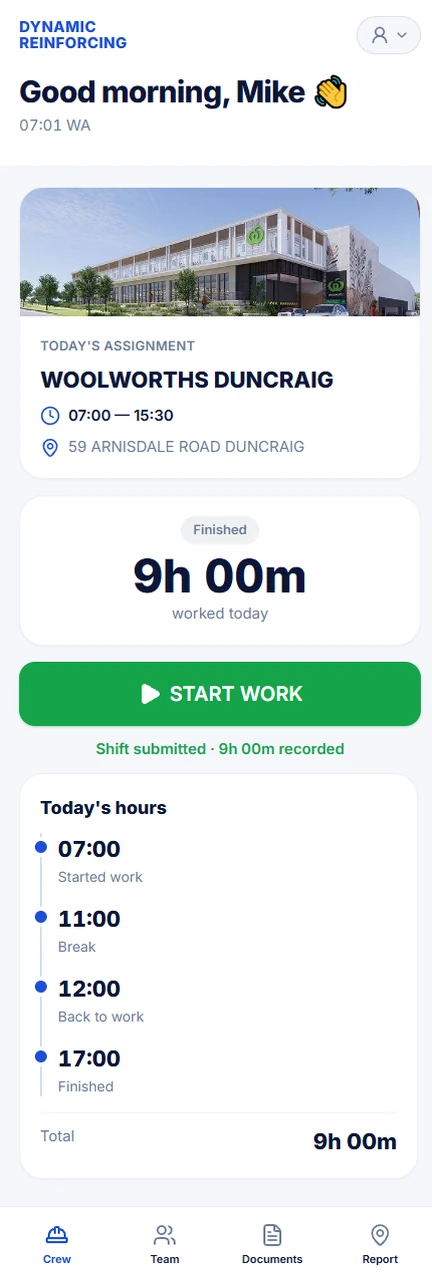
Start your day
Start your dayClock in and out at the site, take a break, and follow today's hours.
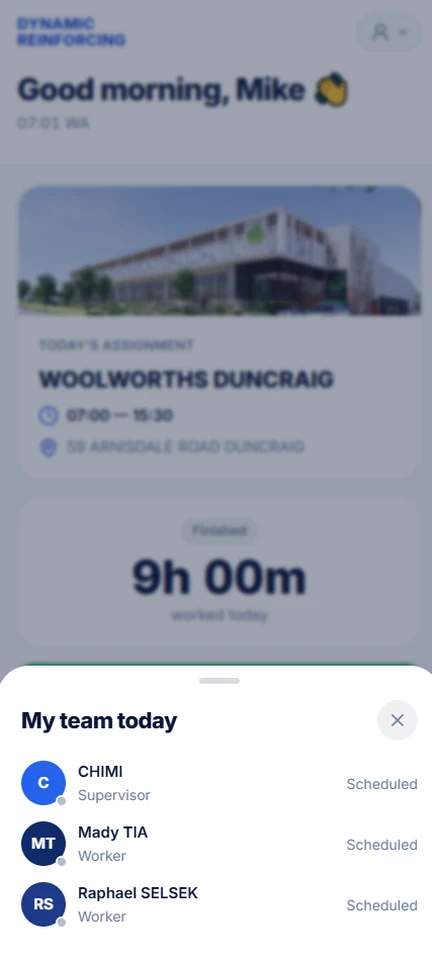
Your team
Your teamSee who is on your site today.
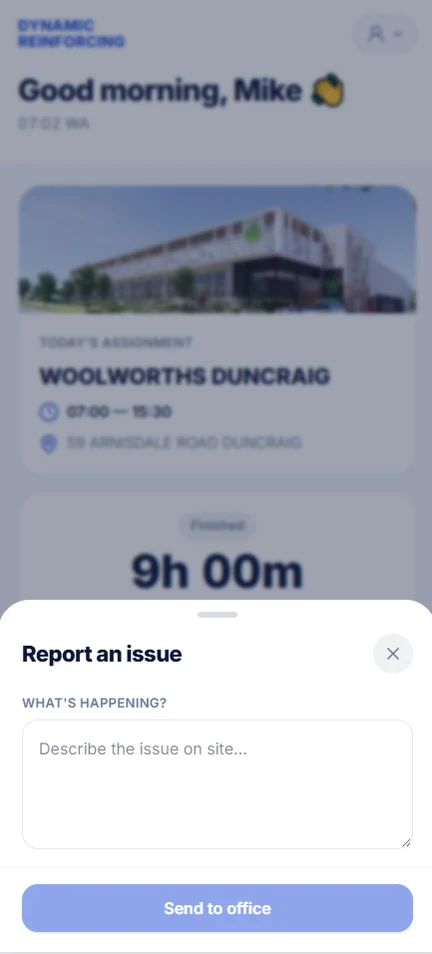
Report an issue
Report an issueTell the office what is happening on site.
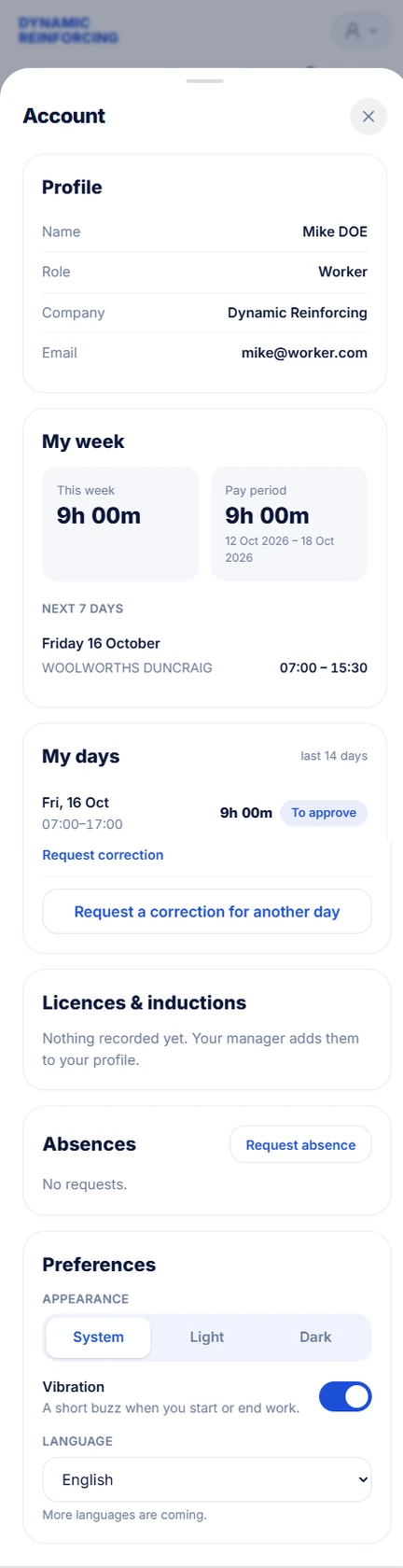
Your account
Your accountYour week, hours and licences. Ask for a correction or an absence.
  • Clock in, break, clock out

    Three big buttons. The time and the site are recorded for you.

  • Works without signal

    Punches wait on the phone and leave by themselves when the network is back.

  • Knows the site

    Today's assignment, hours and a button to navigate there.

  • Plans and documents

    The drawings and dockets of the day, one tap away.

  • Reports with photos

    Quantities placed, remarks and pictures, sent from the slab.

04 / A DAY ON SITE

From 6:30 to 6 pm, without one call too many.

  1. The plan is already in their pocket

    Each worker sees their site, their crew, their hours.

  2. Clock in with one tap

    Arrival logged. The foreman sees who is missing.

  3. Stock drops, you are warned

    Threshold reached: the order leaves before the shortage.

  4. Progress is entered on the spot

    Quantities placed, photos, remarks: at the office, live.

  5. Daily report, signed

    A clean PDF for the client, nothing to type in the evening.

  6. Invoices ready

    Computed from the real progress, for you to approve.

06 / PRICING

Try it free. Then the plan that fits your size.

Starter

Plan the week, follow the hours

CHF 29/ month

Try it free
5sites
5management accounts

Unlimited workers on the crew app

Included

  • Sites, employees, planning
  • Timesheets and crew app
  • Stock, documents, map
  • CSV export

Extra account: CHF 15 / month

Most chosen

Crew

Pay, invoice, follow progress

CHF 69/ month

Try it free
25sites
25management accounts

Unlimited workers on the crew app

Everything in Starter, plus

  • Time cards
  • Invoices and customers
  • Progress follow-up and dashboard
  • Site diary, licences and inductions
  • PDF export and print

Extra account: CHF 10 / month

Company

Run the whole company

CHF 169/ month

Try it free
100sites
100management accounts

Unlimited workers on the crew app

Everything in Crew, plus

  • Reconciliation: delivered / ordered / billed
  • Your own name, logo and colours
  • API and webhooks
  • Your own address (yourcompany.spyver.com)

Extra account: CHF 5 / month

Premium On quote

Your own server, your own domain, your requirements.

  • Dedicated server
  • Your domain and branding
  • Unlimited sites and accounts
  • Onboarding with our team
Ask for a quote

Every plan includes

  • Unlimited workers
  • The crew app, offline too
  • Data isolated per company
  • Backups and encryption
  • Updates, no extra fee

Compare every detail

5Sites
5Management accounts
∞Workers
Extra account

Modules

  • PlanningIncluded
  • TimesheetsIncluded
  • Crew appIncluded
  • Employee recordsIncluded
  • Stock and deliveriesIncluded
  • Site mapIncluded
  • DocumentsIncluded
  • Progress follow-upFrom Crew
  • DashboardFrom Crew
  • Progress reportsFrom Crew
  • CustomersFrom Crew
  • InvoicesFrom Crew
  • Time cardsFrom Crew
  • ReconciliationFrom Company

Features

  • CSV exportIncluded
  • PDF export and printFrom Crew
  • Site diaryFrom Crew
  • Licences and inductionsFrom Crew
  • Your name, logo and coloursFrom Company
  • API and webhooksFrom Company
  • Your own address (yourcompany.spyver.com)From Company

Starter and Crew: 7 days free. Company has no trial: try Crew, then switch when you are ready. Exports stay off during the trial.

Management accounts are the people who run the business (owner, office, managers). Your workers do not count: they use the crew app, without limit.

07 / BEFORE — AFTER

The same Monday morning.

BEFORE

“where are you?”

Blurry photo of the docket

hours_FINAL_v7.xlsx

Who took the 12 mm bars?

Invoice to redo

No answer since yesterday

planning_week_32 (copy)

WITH SPYVER
PlanningUp to date7 crews4 sites staffed. Moving a crew is one drag.
TimesheetsLive34 / 36present. The 2 missing were flagged at 07:05.
Stock1 alert80 %of bar HA12 left. The alert goes out before it runs out.
InvoicesTo send3 readyBuilt from the hours and quantities already entered.
Time cardsAutomaticFridayComputed from validated hours, ready for your payroll. Nothing to retype.
Your MondaySaved−11 hof admin this week. No more Sunday-night paperwork.

Drag to compare

08 / QUESTIONS

What people ask before starting.

Do I need a credit card to try it?

No. You create your account, your instance opens in two minutes and you try Starter or Crew free for 7 days. Company has no trial: try Crew first, then move to Company.

Does my crew have to install anything?

No. Spyver runs in the phone's browser. You can also add it to the home screen like an app.

What happens when the trial ends?

You pick a plan and carry on. Without a plan your account closes, and your data is kept for 14 days before it is deleted.

Can I change plan?

At any time, from the settings. Billing follows.

Is my data separate from other companies'?

Yes. Each company is isolated at the database level, not only in the interface.

Can I have my own domain or my own server?

A custom domain is possible. A dedicated server comes with the Premium plan, on quote.

Your next Monday can be different.

Open your instance now and prove us right: up to 7 days free.

Create my free account

No card · No commitment · Cancel in one click